What Is a Laptop Locker?
A laptop locker is a bank of individually secured compartments, sized for notebook computers, with power inside each door so that devices charge while they sit. Software decides which door opens for which person, and when. The hardware is the visible half; the control layer is what makes it more than furniture.
The shape varies by deployment: wall-recessed banks in a lobby, freestanding units on the IT floor, or a four-door mini locker in a satellite office where a full bank would be overkill. Compartment mixes vary too: a bank that dispenses 15-inch laptops usually carries smaller doors for headsets, docks, and adapters, because those items generate a surprising share of walk-up requests.
Storage-Only Lockers vs. Smart/Automated Lockers
The line between the two categories is not the metal. It’s whether the locker knows anything.
- Storage-only lockers use mechanical keys, combination dials, or standalone keypads. A user gets a compartment and nothing is recorded anywhere a system can query. Many include charging. They are inexpensive, they need no network, and they solve a real problem: parking a device securely for a few hours.
- Smart or automated lockers put every door on an electronic lock under software control, tie access to identity, and log every event. A compartment is assigned to a person and a specific asset rather than simply handed out, and the system records who opened which door, when, what was inside, and whether it came back. Administrators can open a door remotely, reassign a compartment, or flag an overdue device.
Here is the honest limit: if all you need is somewhere for hot-desking staff to lock a personal laptop between meetings, a storage-only bank with charging does that job well, and paying for a software platform you’ll never log into is a waste. The case for smart lockers starts the moment the device inside belongs to the company, and someone will eventually have to prove where it went.
Common Use Cases
The following four use cases cover most enterprise deployments:
- Loaner and break/fix swaps: The single highest-value use case. An employee’s laptop fails, they collect a pre-imaged loaner from a locker, drop the broken unit into an empty compartment, and IT collects it on their own schedule.
- Pooled and shared devices: Shift workers, clinical staff, retail associates, contractors, and training rooms all draw from a shared fleet rather than a one-device-per-person model. The locker becomes the check-in and check-out desk for that pool.
- Onboarding, offboarding, and refresh: New starters collect a provisioned machine on day one without a scheduled handover; leavers return hardware to a locker on their last afternoon, which is usually when IT can least afford to chase them.
- BYOD charging and day storage: Sits slightly apart from the other three. The device isn’t a company asset, so custody records matter less, but reach, power delivery, and door availability matter more. Organizations that run mixed banks (company loaners in the large doors, personal-device charging in the small ones) tend to find door usage climbs and the business case gets easier to make.
How Laptop Lockers Work?
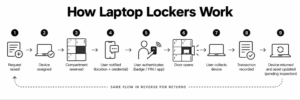
The underlying flow is the same across most smart systems, whether the trigger is a ticket or a walk-up.
A request is raised, or a device is assigned. The system reserves a compartment and notifies the user with a location and a credential. The user authenticates at the bank, the assigned door releases, and the transaction is written to the event log. On return, the process runs backwards: the user authenticates, an empty compartment opens, the device goes in, and the asset record flips from “issued” to “returned, pending inspection.”
Two terms come up constantly here and are worth pinning down. ITSM, IT service management, is the discipline and tooling around service requests, incidents, and fulfillment; ServiceNow and BMC Remedy are the common platforms. ITAM (IT asset management) covers tracking and maintaining hardware and software through their full lifecycle. A locker touches both: it fulfills an ITSM request and it moves an ITAM record. Systems that only do one of those create reconciliation work later.
Access Methods (Badge, PIN, App, RFID)
Most enterprise systems support several credential types and let administrators mix them by user group.
- Corporate badge. Prox or smart cards read at the panel and checked against your directory. Lowest friction for permanent staff, and the method most IT teams default to.
- One-time PIN. Generated per transaction and sent by email or SMS. The practical choice for contractors, visitors, new hires who don’t have a badge yet, and anyone whose badge went missing along with their laptop (a situation badge-only deployments discover the hard way).
- Mobile app or QR code. Useful where phones are already the credential of record, and convenient for remote assignment.
RFID belongs in a different column from the other three, because it identifies the asset rather than the person. Tagged devices are detected as they enter or leave a compartment, so the system can confirm that the laptop returned is the laptop issued. Person-side credentials tell you who; asset-side RFID tells you what. Serious custody tracking wants both.
Accessibility is not optional on a public-facing unit. Interactive controls generally need to sit within reach ranges, and self-service hardware falls under the U.S. Access Board’s ICT accessibility standards, which treat kiosks as self-contained, closed products that must build accessibility in rather than rely on attached assistive technology. Ask any vendor for documentation on reach, speech output, tactile controls, and contrast before the unit is specified into a lobby.
Charging, Security, and Asset Tracking Features
Charging sounds trivial until a loaner comes out at 4% battery. Per-compartment power with USB-C power delivery at the wattage your fleet actually needs is the baseline; charge-state reporting, so the system can hand out the healthiest unit in the bank, is the feature that separates decent systems from good ones.
On security, specify steel construction, individually controlled electronic locks rather than one shared latch bar, tamper detection, and a defined behavior when the network drops. That last one gets skipped in most evaluations and matters more than any spec on the sheet. Ask directly: if the WAN link dies at 2 a.m., does the bank keep authenticating locally and sync afterwards, or does it become a wall of locked doors?
Tracking is the part that earns the system its budget. A smart locker binds a serial number or asset tag to a user and a timestamp at every transition, building a custody chain that nobody has to remember to write down. Over a few months the same data produces usage reporting: which sites run dry, which doors never open, how long a loaner stays out past its intended return. That reporting is usually what justifies the second bank.
Laptop Locker vs. Laptop Vending Machine vs. IT Support Kiosk
These three get used interchangeably in vendor copy, which is unhelpful, because they solve different problems and fail in different ways.
Signifi designs and builds locker and kiosk hardware, so read this comparison with that in mind. The rows below describe categories rather than specific products, and reflect the market as of September 2026.
Key Differences in Functionality
| Dimension |
Laptop Locker |
Laptop Vending Machine |
IT Support Kiosk With Lockers |
| Primary job |
Secure handover and return of assigned devices |
High-volume self-service dispensing of stocked items |
Diagnosis and resolution at the point of need, with handover attached |
| Direction of flow |
Two-way: issue and return through the same bank |
Largely one-way; returns usually need a separate path |
Two-way, plus swap-in-place for a failed device |
| Asset tracking |
Per-door custody records tied to user and asset |
Inventory counts by SKU, weaker per-unit custody |
Full custody records linked to the originating ticket |
| ITSM integration |
Available on enterprise systems; absent on storage-only units |
Often limited to stock and replenishment alerts |
Core to the product: requests open, update, and close against the platform |
| Live human support |
None; the locker is a handover point |
None |
Live technician on an interactive panel, on demand |
| Best-fit environment |
Campuses, hospitals, offices with a managed loaner pool |
Accessories, peripherals, and consumables at volume |
Distributed sites and satellite offices with no local IT presence |
Which One Fits Your Use Case?
Pick by the question you are trying to answer.
If the problem is “our loaner pool is a cupboard, a spreadsheet, and a person who remembers things,” a laptop locker fixes it directly. Devices go in and out through one controlled point with a record attached.
If the problem is volume of small items (headsets, mice, adapters, cables walking off at a rate nobody can account for), a laptop vending machine is the better economic fit, because dispensing is one-directional by nature and per-unit custody matters less than knowing how many you issued last quarter.
If the problem is that your people are in 30 buildings and your technicians are in one, the handover is only half of it. Someone still has to work out whether the machine needs a swap, a reimage, or a five-minute settings change. That diagnostic step is where an IT support kiosk does something neither of the other two can. It puts a technician on screen at the same place the hardware lives.
Benefits of Automated Laptop Lockers for IT Teams
Automated laptop lockers can support IT teams across several stages of device distribution, collection, and day-to-day management. The following are some of the key areas where they can make a difference:
Reduced Help Desk Workload
Ticket deflection is the usual framing, and it’s only partly right. A locker rarely removes the ticket; it removes the touches on the ticket: the scheduling email, the desk visit, the “are you at your desk?” message, the walk across campus. Deskside support time is the most expensive hour in most IT budgets, and a large share of it goes to logistics rather than expertise.
The knock-on effect matters more. When handover stops consuming the team’s calendar, the same headcount covers a larger population, and first-contact resolution (FCR, the share of issues closed on the first interaction) improves for reasons unrelated to technical skill.
Faster Loaner Turnaround
Mean time to resolution (MTTR) on a hardware incident is usually dominated by waiting, not working. A locker collapses the waiting: the loaner is already imaged, charged, and sitting 40 feet from the employee’s desk at 7 a.m. Across Signifi’s campus, retail, and enterprise deployments the pattern repeats: the constraint moves off the handover and onto the repair itself, which is where IT wanted it. Returns speed up too, because a drop-off that takes 30 seconds on the way out of the building gets done, while one that requires finding a technician does not.
Audit-Ready Custody Records
The Visibility Issue is what most teams are really buying their way out of. Hardware asset management (HAM) depends on knowing where devices are, and manual sign-out sheets decay the moment the person maintaining them takes a week off.
A smart locker produces an unbroken record as a byproduct of normal use. Every issue, return, and reassignment carries a user, an asset identifier, and a timestamp. That record supports internal audit, security investigations, and the evidence requirements in formal frameworks. ISO/IEC 19770-1, the international standard for IT asset management systems, is built around exactly this kind of trustworthy lifecycle data. Pair a locker with disciplined process and an IT asset audit stops being a two-week archaeology project.
To be fair about scope: a locker records custody at the moment of exchange. It tells you nothing about what happens to the device afterwards. Endpoint management, encryption, and mobile device management (MDM) still do that work, and no locker replaces them.
What to Look for in an Enterprise Laptop Locker System?
Choosing the right enterprise laptop locker involves looking beyond basic storage and access features. The following are some of the key factors to evaluate when comparing systems and vendors:
Integration With ITSM/ITAM Platforms
A locker that doesn’t talk to your service platform creates a second system of record, and second systems of record always drift. Look for RESTful API integration with ServiceNow, Remedy, or whatever you run, and confirm what actually flows in each direction: can a ticket trigger a compartment assignment automatically, does collection update the ticket state, does the asset record in your CMDB change when the device changes hands?
Ask about MDM and directory integration in the same conversation. Access rights that mirror your identity provider are far easier to govern than a locker-specific user list someone has to maintain by hand.
Live IT Support vs. Storage-Only
Storage-only lockers assume the diagnosis already happened somewhere else. For a mature help desk with a well-stocked loaner pool and staff on site, that assumption holds.
The assumption breaks in distributed environments. A branch office, a clinic, a satellite campus, a store: all places with no technician on the floor. Each hits the same wall, where the employee knows something is wrong but not what, and the locker has nothing to offer until a remote agent triages the issue and assigns a device. Systems that put live technician support at the hardware close that gap. The employee walks up, talks to a real person on the panel, and leaves with either a fix or a working machine from the compartment that just opened.
Two more items belong on the evaluation list. Field configurability (whether compartment sizes, power, and modules can be reconfigured on site rather than replaced) decides how well the investment survives your next fleet refresh. And accessibility compliance needs to be documented rather than asserted.
How Can Signifi Help With Self-Service Laptop Distribution?
Signifi’s Tech Express Desk (TED) combines a smart locker bank with an interactive panel that connects employees to a live IT technician on demand, 24/7, at any office or satellite site. Employees get support, collect a replacement, return a failed device, or swap a peripheral in a single visit. TED runs on SignifiVISION™, our software platform, and integrates with ITSM systems including ServiceNow and Remedy through RESTful APIs, so requests and asset records stay in the tools your team already works in.
We design, engineer, and manufacture our hardware in-house: configurable in the field, built to ADA and Section 508 accessibility requirements, and delivered as one system rather than a locker with someone else’s software bolted on. Organizations including Canadian Tire, Google, ServiceNow, Unisys, Delta, and Best Buy use Signifi hardware. The outcomes our customers care about are consistent: around-the-clock self-service access, fewer tickets tying up deskside staff, lifecycle visibility from provisioning to retirement, and less asset loss.
If your loaner program has outgrown a cupboard and a spreadsheet, contact us to learn how our smart lockers and IT support kiosks can take the hardware logistics off your IT team.

