Key Takeaways
- Smart lockers fall into three budget tiers: entry-level, mid-tier configurable, and enterprise-grade integrated.
- A commercial smart locker is owned and configured by the business; a consumer parcel locker is fixed and carrier-managed.
- USPS and Amazon lockers handle pickup only — they don’t support issuing or recovering assets.
- UK buyers should confirm 230V/50Hz compatibility, regional certifications, and weather rating for outdoor units.
- Enterprise-grade lockers fit distributed workforces needing ITSM integration and full audit logging.
- Choose the tier based on where the use case will be in two years, not just today’s need.
Buying a locker system sounds simple until you start comparing options. One vendor quotes a low price for a fixed row of boxes. Another talks about configurable compartments, software, and integrations that cost more but do far more. And if you have ever collected a parcel from a USPS or Amazon Hub unit, you might reasonably wonder why a business locker costs what it does. This guide walks through the budget tiers, what buyers in the UK should plan for, and where purpose-built commercial systems part ways with the consumer parcel lockers you see in shops and lobbies.
What Counts as a “Smart Locker”?
The term covers a wide range of products. A single wall-mounted box with a keypad is a smart locker. Similarly, a floor-standing bank of compartments tied into enterprise software is also a smart locker. What they share is the same basic idea: a person is granted access to a specific compartment through a code, badge, app, or credential, and the system records who opened what and when. That audit trail is the difference between a “locker” and a “smart locker.”
Beyond that shared foundation, the products split into two families with very different jobs.
Commercial and Enterprise Smart Lockers vs. Consumer Parcel Lockers
A consumer parcel locker exists to hand a package to a member of the public. The carrier drops the item, the recipient gets a one-time code, and the transaction ends. The compartments are fixed, the software belongs to the carrier, and you cannot reconfigure the unit for anything else.
A commercial or enterprise smart locker is a managed asset system. It handles issuing and returning laptops, phones, tools, keys, uniforms, medical supplies, or click-and-collect orders, often the same unit doing several of these jobs. Compartments can be resized, access rules can be set per user or group, and the locker reports into the software you administer.
The practical takeaway: a consumer parcel locker is a delivery endpoint. A commercial smart locker is infrastructure you configure and own.
Smart Locker Budget Tiers Explained
Pricing varies too much to quote a single number honestly. It depends on compartment count and sizes, indoor versus outdoor build, software features, integrations, installation, and ongoing support. What is consistent is that most smart lockers fall into three tiers, and knowing which tier you need saves a lot of wasted quotes. Treat the figures below as relative positioning, not fixed prices. Always get a scoped quote for your site.
Tier 1: Entry-Level / Budget Options
Budget lockers are the starting point for teams that need controlled storage without much complexity. Think a fixed set of compartments, PIN or basic RFID access, and either no software or a light management app. They suit a single location, a modest number of users, and a stable use case that will not change much.
Where budget lockers get expensive is later. Fixed compartments mean you cannot resize a bank when your item mix changes, reporting is usually thin, and integrations with your existing systems are limited or absent. For a small office parcel drop or a fixed pool of shared devices, that trade-off can be fine. For anything that will grow or connect to other software, it often is not.
Tier 2: Mid-Tier Configurable Systems
The mid tier is where “smart” starts to earn the name. These systems offer mixed compartment sizes, badge or app access, cloud management with real reporting, and configuration options that let one unit serve several purposes. You can typically adjust compartments in the field, set access rules by team, and pull usage data.
This tier fits multi-department offices, retail back-of-house operations, campuses, and property managers who need more than a parcel drop but do not yet need deep enterprise integration.
Tier 3: Enterprise-Grade, Fully Integrated Lockers
Enterprise smart locker systems are built to run at scale across many sites and to connect to the software your organization already uses. That means API integration with ITSM or inventory platforms, granular access control, full audit logging, indoor and outdoor hardware options, and hardware that can be reconfigured without a full replacement.
The cost is higher, but so is the scope: you are buying a managed asset network, not a storage cabinet. Organizations distributing IT hardware across a hybrid workforce usually land here, and the benefits of smart lockers in enterprise IT (ticket deflection, lifecycle visibility, reduced asset loss), are what justify the investment.
| Tier |
Typical Features |
Software & Integration |
Best Fit |
| Entry-level / budget |
Fixed compartments, PIN or basic RFID access, minimal reporting |
Little to none, or a light standalone app |
Single site, stable use case, small user pool, simple parcel or device drop |
| Mid-tier configurable |
Mixed compartment sizes, badge/app access, field-adjustable layout, real usage reporting |
Cloud management, exportable data, and some integrations |
Multi-department offices, retail back-of-house, campuses, property managers |
| Enterprise-grade integrated |
Configurable indoor/outdoor hardware, granular access control, full audit logging, reconfigurable without swaps |
Deep API integration (ITSM, inventory), central multi-site management |
Distributed workforces, regulated environments, multi-location asset networks |
Smart Lockers in the UK: Availability and Considerations
Smart lockers are widely available to UK buyers, both from local resellers and from international manufacturers who ship and provide support in the region. The main differences from a domestic US purchase are lead times, power and connectivity standards, and local compliance. None of them are blockers, but all are worth planning for before you sign.
Sourcing and Lead Times for UK Buyers
UK buyers generally choose between a locally stocked standard unit, which ships faster but offers less configuration, and a configured or manufactured-to-order system, which takes longer but matches your exact compartment mix and site conditions. If your layout is non-standard, outdoor placement, or unusual item sizes are involved, a build-to-order is usually the right call, and you should ask about manufacturing and shipping timelines up front.
When you compare providers, confirm who handles installation and ongoing support in the UK specifically. A manufacturer with regional support, or a partner network on the ground, matters more than headline price once the unit is installed and something needs attention.
Regional Compliance and Power/Connectivity Notes
Hardware sold in the UK should suit local power (230V/50Hz) and carry the appropriate regional certifications and markings. Connectivity is the other practical item: confirm whether the locker runs on wired network, Wi-Fi, or cellular, and check that its data handling fits UK and EU data-protection expectations, since a smart locker logs who accessed what and when.
For outdoor installations, weather rating and temperature control move from nice-to-have to necessary. Ask about ingress protection, heating or cooling for sensitive contents, and how the unit performs through a British winter. A manufacturer that engineers its own hardware can usually offer indoor and outdoor variants and adjust power and temperature options to the site, rather than forcing a fixed spec.
Smart Lockers vs. USPS Lockers
USPS parcel lockers and commercial smart lockers are often compared because they look similar from the outside. They solve different problems.
USPS operates self-service parcel lockers. Its gopost and Smart Package Lockers are such that recipients can collect packages on their own schedule. The design goal is straightforward: give postal customers a secure, around-the-clock place to receive and, in some cases, send parcels. The compartments, software, and access flow all belong to USPS, and the units are placed and managed by the postal service.
For personal package delivery, that model works well. What it is not built to do is let a business define its own access rules, track its own assets, or repurpose the hardware for anything other than mail.
Where do Commercial Smart Lockers Go Further?
From Signifi’s perspective as a manufacturer, the gap is about ownership and control. A commercial smart locker is administered by your organization: you set who can open which compartment, you configure the compartment mix, you own the audit data, and you can integrate the system with the software you already run. You can issue and recover equipment, not just receive parcels and recovery. The return of items is something consumer parcel lockers are not designed to handle as a managed workflow.
Put simply, a USPS locker is a place to collect your mail. A commercial smart locker is a system you use to manage your things.
Smart Lockers vs. Amazon Lockers
The Amazon Hub Locker comparison follows the same logic, with one wrinkle: Amazon’s network is enormous and convenient, which makes the contrast in purpose easy to miss.
Amazon Hub Lockers are pickup points for Amazon orders, placed in shops, apartment buildings, and public spaces. The unit belongs to Amazon, the software belongs to Amazon, and the job is to hand a shopper their order securely. For that job, it is convenient and well-suited.
A workplace or business use case is different in kind. You are not receiving one company’s retail orders. You are issuing laptops to new hires, lending tools to technicians, dispensing keys to drivers, or handling click-and-collect for your own customers, and you need a record of every transaction tied to a person. That calls for configurable compartments, your own access control, and software you administer.
The table below lays out the three side by side. The commercial column reflects Signifi’s perspective as a manufacturer of configurable systems; the USPS and Amazon columns describe consumer parcel programs as their operators document them.
| |
Commercial Smart Locker (Signifi’s perspective) |
USPS Parcel Locker |
Amazon Hub Locker |
| Primary purpose |
Managed issuing, return, and custody of business assets and orders |
Personal mail and parcel pickup/drop-off |
Pickup of Amazon retail orders |
| Who it’s for |
Employers, IT teams, retailers, campuses, property managers |
Postal customers |
Amazon shoppers |
| Configurability |
Compartment sizes, access rules, and integrations set by the owner |
Fixed; managed by USPS |
Fixed; managed by Amazon |
| Ownership & data |
Owned and administered by your organization; you hold the audit data |
Owned and operated by USPS |
Owned and operated by Amazon |
| Handles returns/recovery |
Yes. Issuing and recovery as a tracked workflow |
Limited to postal sending where offered |
No. Pickup only |
None of this makes the consumer lockers “worse.” They are excellent at what they are built for. They are simply not a substitute for a system your business configures, integrates, and owns.
Finding Smart Lockers Near You
Searches for “smart lockers near me” usually turn up two kinds of results: consumer parcel networks like the ones above, and regional resellers or manufacturers who sell and install business systems. For a commercial purchase, the second group is what you want and “near” matters less than “supported.” A provider that can install, service, and support your unit in your region beats one that happens to be closer but cannot show up when you need them.
How to Evaluate a Local or Regional Smart Locker Provider?
A few questions separate a real fit from a mismatched quote:
- Do they make the hardware or resell it? A manufacturer can configure compartments, offer indoor and outdoor builds, and adjust power and temperature options. A reseller is limited to what they stock.
- Can the system be reconfigured later without a hardware swap? Your item mix will change; the locker should adapt without a rip-and-replace.
- What software runs it, and does it integrate? Ask about access control, reporting, audit logs, and API integration with the systems you already use.
- Who handles installation and ongoing support in your region? Confirm response times and whether support is direct or through a partner.
- Is it compliant for your setting? Accessibility standards, power and connectivity, and data handling should all fit where you plan to install.
Answering those five questions early is the fastest way to shorten a shortlist and avoid a system you outgrow in a year.
Choosing the Right Smart Locker for Your Budget and Use Case
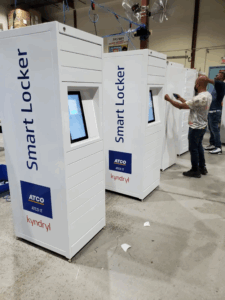
The right choice comes from matching the tier to the use case rather than chasing the lowest quote. A budget unit is genuinely the right answer for a small, stable, single-site need. A mid-tier configurable system fits most growing offices, retail operations, and campuses. An enterprise-grade, integrated system is the answer when you are managing assets across many locations, connecting to existing software, or handling items that demand strict access control and a full audit trail.
Two principles hold across every tier. First, buy for where you will be in two years, not just today. Reconfigurable hardware and real software cost more up front but avoid a costly replacement later. Second, weigh ownership and control, not just price: a system you configure, integrate, and own does things a fixed consumer locker never will.
How Signifi Can Help With Your Smart Locker Decision
The hard part of a locker purchase is usually not understanding the concept. It is executing it across real sites, real users, and software you already run. That is where owning both the hardware and the platform changes the math.
Signifi designs, engineers, and builds its own smart locker hardware in-house, so compartments, indoor or outdoor builds, and power and temperature options can be configured to your site and reconfigured later without a hardware swap. Our HD Smart Lockers handle full-size equipment and mixed asset types, while the compact Mini Locker suits smaller items and tighter spaces. Where controlled key handoff is required, the Security Key Dispenser covers it.
Every unit is run by SignifiVISION™, the cloud platform that manages access, logs every transaction, and integrates with the systems you already use through RESTful APIs. Because it is one system rather than a bolt-on, you get 24/7 self-service access, a complete audit trail, reduced asset loss, and lifecycle visibility from issue to return, with ADA and Section 508 accessibility built in.
If you are weighing budget tiers or planning a rollout, including in the UK, contact us to talk through which configuration fits your use case and site.
Frequently Asked Questions
What are smart lockers, and how do they work?
Smart lockers are secure storage units connected to software that manages access. A user is granted entry to a specific compartment through a code, badge, app, or credential, and the system records each pickup and drop-off. Commercial systems add configurable compartments, access rules, reporting, and integrations that consumer parcel lockers do not offer.
How do I find smart lockers near me for a business, not just parcel pickup?
Search results for “smart lockers near me” mix consumer parcel networks with commercial providers. For a business purchase, look for a manufacturer or regional reseller that can configure, install, and support a system in your area. Prioritize a provider that offers local support and hardware you can reconfigure over one that is simply the closest.
How are smart lockers different from USPS lockers?
USPS parcel lockers, such as the Smart Package Lockers and gopost programs, are built for personal mail pickup and are owned and managed by the postal service. A commercial smart locker is administered by your own organization. You set access rules, configure compartments, own the audit data, and can issue and recover assets, not just receive parcels.
How do smart lockers compare to Amazon Hub Lockers?
Amazon Hub Lockers are pickup points for Amazon retail orders, operated by Amazon on its own software. They are convenient for shoppers but cannot be configured or integrated by a business. A commercial smart locker handles workplace jobs, issuing equipment, lending tools, and tracking returns, with compartments, access control, and software you administer.
Can I buy smart lockers in the UK, and what should I plan for?
Yes. Smart lockers are available to UK buyers from local resellers and international manufacturers that ship and provide support in the region. Plan for lead times on configured units, confirm the hardware suits UK power (230V/50Hz) and carries appropriate certifications, check connectivity and data-handling requirements, and specify weather rating and temperature control for outdoor installations.
What is a realistic budget for smart lockers?
Pricing depends on compartment count and sizes, indoor or outdoor build, software features, integrations, and installation, so vendors quote per project rather than by a fixed list price. Most options fall into three tiers: entry-level budget units, mid-tier configurable systems, and enterprise-grade integrated networks. Match the tier to your use case and get a scoped quote for your specific site.

