Most writing about hybrid work still argues about whether it lasts. For anyone running IT, that argument closed a while ago. Gallup’s Q2 2025 data put 51% of remote-capable U.S. employees in a hybrid arrangement and 21% fully on-site, and the Stanford-affiliated Global Survey of Working Arrangements found work-from-home days flattening at roughly 1.27 days a week in 2024-25. The numbers move a point or two each quarter. The shape holds.
So the useful question stopped being how many days. It became architectural: where does support physically live? A workforce of 4,000 spread across two headquarters buildings, eleven satellite offices, and 1,800 kitchen tables doesn’t have one support problem. It has three. The ticket a remote session fixes in six minutes and the cracked screen that needs a machine swapped are not the same job.
This article covers what gets harder when work splits across locations, the support models available, and how to decide which sites justify a physical presence.
What Makes IT Support Harder in a Hybrid Workplace?
The old support model rested on a quiet assumption: the employee, the hardware, and a technician were all inside a building you controlled. Hybrid work breaks all three, at different times, for different people.
Key Takeaway: Hybrid IT support is an architecture problem, not a policy one. A hybrid workforce splits into four populations (home-based, hub, satellite and rotating), and each generates a different kind of ticket. Remote tooling closes the software half everywhere; the hardware half still needs a physical point of presence at the sites where distance from a staffed hub makes every dispatch expensive.
Split Locations, Split Support Needs
A hybrid workforce behaves like four separate populations, each generating a different kind of ticket.
- Home-based employees generate software, access, VPN, and connectivity tickets, almost all of which resolve remotely. Their hardware problems are the expensive exception: there’s no local shelf to pull a replacement from.
- Employees at a staffed hub are the easiest to support and, awkwardly, the group most support budgets were designed around.
- Employees at satellite or branch sites are the hard case: on company premises, with company equipment, further from a technician than anyone.
- Employees who rotate carry the docking-station and “it worked yesterday at home” problems that are tedious to diagnose from a distance.
Support strategies fail when they average these four together. You end up building for the middle of a distribution that has almost nobody in it.
Inconsistent Access to On-Site IT Staff
Staffing follows history rather than need. Technicians sit where headcount used to be concentrated, which is rarely where it is now. A branch that opened as a 12-person sales outpost and quietly grew to 60 is still covered by whoever happens to be driving that way.
That inconsistency stays invisible because it shows up as travel. Writing on desktop support cost per ticket, HDI’s Jeff Rumburg notes that technician travel runs from five minutes each way on a dense campus to an hour or more in low-density environments, and that travel is the biggest single reason deskside tickets cost multiples of a service desk ticket. More sites with thinner headcount means paying that premium on a growing share of your volume.
The employee’s experience of IT has gone binary as a result: either a remote session can touch the issue, or they wait days.
Common Hybrid Workplace IT Challenges
Hybrid workplaces introduce a different set of operational challenges for IT teams, particularly when employees and equipment are spread across multiple locations. The following are the most common challenges organizations need to address:
Equipment Provisioning Across Locations
Onboarding used to mean a laptop waiting on a desk. Now it means deciding, per hire, whether to ship to a home address, stage at a hub, or hold the machine at the site where that person will actually spend Tuesdays. Shipping works, and shipping is expensive: imaging, packing, courier costs, and a delivery window nobody controls. It also opens a chain-of-custody gap: between the staging room and first sign-in, the asset record says “in transit,” a polite way of saying unknown. Across every new hire, refresh cycle, and offboarding return, provisioning turns into a logistics function most IT teams never signed up to run.
Break-Fix Support Without a Local Technician
Remote tools handle software, configuration, identity, and access. They cannot handle a swollen battery, a dead dock, a laptop that won’t POST, or a lost headset 20 minutes before a client call. Those need a physical object placed in a human hand. With no technician at the site, you have three options: ship a replacement and lose a day, make the employee drive to a staffed location, or dispatch someone and pay the travel premium. All three are bad in different ways. A fault that takes four minutes to fix with the right spare in the right building takes one to three days when the spare is 90 miles away.
Asset Visibility Across a Distributed Fleet
IT asset management, or ITAM, is the practice of tracking and maintaining hardware and software across its full lifecycle. Single-building organizations had a physical backstop: you could walk the floor and count. Distributed fleets removed it, and records now drift for months before anyone notices.
Asset tracking across a distributed workforce covers BYOD policy, off-premises endpoint security, and audit discipline. What matters for support strategy is narrower: a model that moves hardware around without writing back to your asset system degrades your records every time it’s used.
Building an IT Support Model for Hybrid Teams
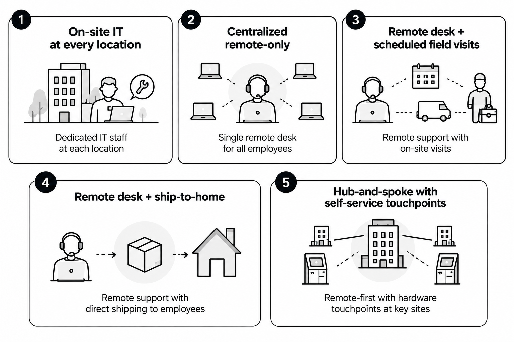
Five approaches cover most of what organizations actually do. None is universally right, and the real decision is usually not which one but which one where.
| Support Model |
Coverage |
Relative Cost per Site |
Hardware Resolution |
Employee Experience |
Where It Breaks Down |
| On-site IT at every location |
Complete, at staffed sites only |
Highest: salaried headcount per site |
Same-day, often same-hour |
Excellent when staffed; nonexistent at home |
Doesn’t scale past a few sites; idle technicians at quiet ones |
| Centralized remote-only |
Every employee, every location |
Lowest: no per-site cost |
Days; depends on shipping |
Strong for software, poor for hardware |
Anything needing physical hands; branch sites with recurring faults |
| Remote desk + scheduled field visits |
All sites, on a cadence |
Moderate; travel-dominated |
Tied to the visit calendar |
Predictable but slow |
Urgent faults between visits; cost grows with site count |
| Remote desk + ship-to-home |
Home-based staff especially |
Moderate; courier and imaging |
1-3 days typical |
Acceptable for planned swaps |
Unplanned failures; custody gaps in transit |
| Hub-and-spoke with self-service touchpoints |
Remote-first, physical at chosen sites |
One-time hardware plus software |
Minutes at equipped sites |
Strong at equipped sites; unchanged at home |
Sites below the volume threshold; home-only staff |
On-site IT at every location remains appropriate where sites have high employee density, frequent hardware incidents, or operational requirements that demand immediate physical support. Its main constraint is scalability: maintaining dedicated technicians at every location becomes expensive when ticket volume varies significantly between sites.
Centralized Remote Support + Local Self-Service Touchpoints
Most large hybrid organizations put the intelligence in one place and the inventory in several: a single service desk closing every ticket software can close, and physical touchpoints at a chosen subset of locations handling the residue.
The handoff between the two halves is what makes it work. A technician who diagnoses a failed dock during a remote session should be able to release a replacement to a locker at the employee’s nearest equipped site inside the same ticket. No second queue, no purchase request. When that handoff is manual, you’ve built a remote-only model with expensive cabinets attached to it.
Hub-and-Spoke Support Using Kiosks and Lockers at Key Sites
Hub-and-spoke is that model with an explicit geography. A few hubs carry depth (staffed IT, spares inventory, staging and imaging). Spokes carry a self-service touchpoint: an interactive panel connecting the employee to a remote technician, plus a locker bank holding laptops, docks, headsets, and chargers that the technician can release. The employee walks to the panel, talks to a person, and walks away with the part.
The decision nobody publishes a clean answer for is which sites get one. Vendors say “all of them,” which is self-serving. Consultants say “it depends,” which is useless. Here’s how to run it on data you already have.
Pull your hardware-incident rate from your own tickets. Count the last 12 months of tickets that needed physical hands-on work on a device (swaps, peripheral replacements, battery and dock failures, damage, loss) and divide by headcount. Industry averages aren’t useful here; the spread between organizations is wide, and your own number is easier to defend in a budget conversation.
Multiply that rate by each site’s headcount for expected physical events per year, then by real round-trip travel time: parking and building access included, not the map estimate. What falls out is technician-hours per site spent purely on travel. Sites where that runs into multiple weeks are already paying for a touchpoint, in windshield time and employee downtime.
A second filter matters as much: distance from the nearest hub. A 40-person office 15 minutes from a staffed building rarely justifies its own hardware. The same office three hours away almost always does. Density beats headcount.
The honest limit is worth stating, because most vendor content skips it. A locker in an office does nothing for the employee whose laptop dies at home on a Thursday and won’t be in a building until next week. Hub-and-spoke shrinks the hardware problem to the people who visit a site; it doesn’t remove it. Home-only employees still need a shipping path, and a company with two offices and 300 people will do better with a courier account and a good remote desk. The model earns its cost when site count is high, and density is low.
Technology That Supports Hybrid IT
Technology provides the infrastructure that connects remote support with the physical needs of a distributed workforce. The following are the key technologies that support a hybrid IT service desk:
Remote Diagnostics and Ticketing Software
The IT service management platform (ITSM, the system handling ticketing, workflow, and change) is the spine of any hybrid support model. Most organizations already run ServiceNow, Remedy, or something comparable, so the question is how much of the hybrid workflow it can actually see.
Remote diagnostics, remote control, endpoint management, and mobile device management (MDM) feed that spine and close the software half of ticket volume without anyone traveling. First contact resolution (FCR, meaning tickets resolved without escalation) and mean time to resolution (MTTR) both improve quickly, which is why most organizations have already done this part. The limitation is structural: every one of these tools acts on software, and none can hand someone a charger.
Self-Service Kiosks for On-Site Hardware Needs
A self-service IT kiosk is the hardware counterpart to the remote desk: an interactive terminal, usually paired with automated lockers, that dispenses and accepts equipment under IT’s control with no IT employee present. Badge, PIN, or corporate SSO ties each transaction to a named person, and the locker opens only that person’s compartment. Three properties separate a working deployment from an expensive cabinet:
- It writes back. Every dispense, return, and swap updates the asset record automatically, closing the visibility gap rather than widening it.
- It’s reachable by everyone. Kiosks are closed systems (a user can’t attach their own assistive technology), so accessibility has to be built into the hardware. The U.S. Access Board’s self-service transaction machines rulemaking covers reach ranges, speech output, and display requirements for this class of device, and Section 508 already applies to federal and many federally funded deployments. Retrofitting a kiosk is not a software update.
- It connects to a human. Dispensing alone solves half the problem; a panel that puts a live technician on screen at the moment of collection turns a vending machine into a support desk.
Signifi’s overview of self-service kiosks for hardware distribution in ITAM goes deeper into dispensing workflows.
How a Hub-and-Spoke Support Model Works in Practice?
What follows is an illustrative walkthrough rather than a named customer deployment, but the mechanics are the ones a real rollout runs on. Picture a company of 3,500: two hub offices with staffed IT, nine regional sites without, and about half the workforce home-based on any given day. Last year’s tickets show roughly 900 incidents needing physical hands on a device, most of them at the nine unstaffed sites: no technician, two-hour average round trip from the nearest hub.
Four of the nine clear both filters: enough hardware volume to matter, and far enough out that every visit costs half a technician’s day. Those four get a Tech Express Desk (TED), an interactive support panel with an attached locker bank. The other five keep the existing arrangement, because the math doesn’t support hardware there and pretending otherwise would just be a larger invoice.
The workflow then changes shape. An employee at an equipped site raises a ticket for a failing dock. The central desk triages remotely, confirms it’s hardware, and releases a replacement to a locker in that employee’s building, inside the same ticket and through the ITSM integration. They collect it that afternoon, drop the dead unit into a return bay, and the asset record updates without anyone typing a tag.
The coverage map is what really changed: IT is present at six locations while staffing two, and hardware tickets that used to wait days now close in the time it takes to walk downstairs.
Building Your Hybrid Workplace IT Support Roadmap
Start with measurement, not procurement. Three months of honest ticket data, segmented by location and by whether resolution needed physical hands, will tell you more than any vendor assessment. From there, the sequence is stable enough:
- Segment your workforce into the four groups above (home-based, hub, satellite, rotating) and count them. Most organizations are surprised by at least one number.
- Calculate hardware-incident rate per site and the travel time attached to it, then rank sites by technician-hours consumed, not headcount.
- Fix the remote half first. Physical touchpoints won’t fix weak FCR and MTTR; you’ll just have bought hardware to compensate for a process gap.
- Pilot one or two spoke sites at the top of the ranking, measuring hardware resolution time and dispatch volume before and after.
- Integrate before you expand. A touchpoint that doesn’t write to your ITSM and asset systems just creates a second source of truth.
- Revisit the map annually. A site that didn’t justify a touchpoint in year one may clear the threshold by year three.
The roadmap is deliberately unglamorous. Teams that get hybrid support right are usually the ones that resisted buying anything until they could name the specific sites where the current model was quietly bleeding technician time.
How Can Signifi Help With Hybrid Workplace IT Support?
Hub-and-spoke support isn’t a difficult concept. Executing it across eleven locations, three ITSM workflows, and a hardware fleet that changes every quarter is where teams get stuck.
That’s the part we build for. The Tech Express Desk (TED) puts a live IT technician on an interactive panel at any office or satellite site, with an attached locker bank for dispensing, returning, and swapping laptops and peripherals 24/7. It runs on SignifiVISION™, our software platform, and integrates with ServiceNow, Remedy, and other ITSM systems through RESTful APIs, so a technician can release a device inside the ticket they’re already working on, and the asset record updates itself from provisioning through to retirement.
We design, engineer, and manufacture the hardware ourselves, which matters more than it sounds. Locker configurations can be changed in the field as your device mix shifts; units are built to ADA and Section 508 accessibility requirements; and the hardware and software are one system rather than a locker with someone else’s software bolted on. We’ve deployed across multiple client locations for organizations supporting distributed and hybrid teams, including Canadian Tire, Google, ServiceNow, Unisys, Delta, and Best Buy.
The outcomes are the ordinary ones: hardware tickets closing in minutes instead of days, fewer deskside dispatches, less asset loss, and a support presence at sites that will never justify a full-time technician. Contact us to talk through which of your locations would genuinely benefit from a physical touchpoint, and which are better served by the remote desk you already have.

